How Modes Works
Modes is built around one idea: everything in your life deserves its own space.
Most productivity apps give you one big list. Work tasks sit next to grocery reminders. Client deadlines compete with personal goals. Everything bleeds into everything else, and instead of feeling organised you just feel overwhelmed.
Modes works differently. It gives every area of your life its own compartment — and keeps them completely separate, so you can focus on one thing at a time without the rest of the noise getting in the way.
Modes
A Mode is a compartment. It's a dedicated space for one area of your life — and everything inside it stays there.
You might have a Mode for Work, one for Personal, one for a Side Project, one for Fitness. Or something completely different — the app doesn't tell you how to organise your life, it just gives you the structure to do it your way.
When you're in Work mode, you see Work. When you switch to Personal, you see Personal. Nothing crosses over unless you want it to.
Modes are the foundation of everything in the app. Every goal, every project, every task lives inside one.
Examples of Modes people use: Work · Personal · Side Project · Finance · Health · Travel · Learning · Family · Creative · Business
Goals, Projects, Milestones and Tasks
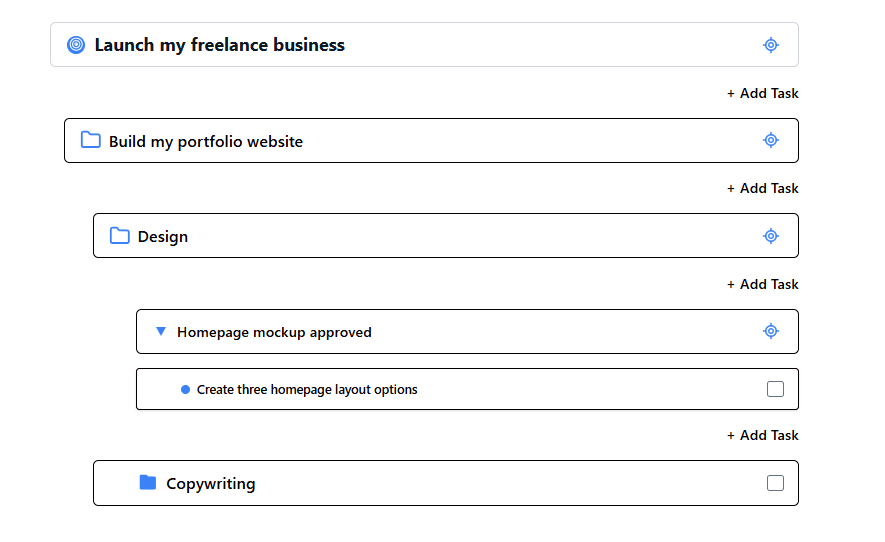
Inside each Mode, you get four building blocks for organising your work. What sets the app apart is how flexible these building blocks are — you can keep things simple with a flat list of tasks, or build out as much structure as your work demands. There's no single right way to use them.
Goals
A Goal is the big picture. It's an outcome you're working toward — something meaningful enough that it will take real time and effort to achieve. Launch a business. Get fit. Ship a product. Learn a language.
Goals give your work direction. Everything you put inside a Goal is connected to that bigger outcome.
Projects
A Project is a defined piece of work. It might live inside a Goal, or it can stand on its own inside a Mode — whatever makes sense for how you work.
Projects are flexible. A Project can contain other Projects inside it, which is useful when a piece of work is big enough to have distinct parts that each deserve their own space. A Project can also contain Milestones and Tasks directly.
For example — if your Goal is to launch a business, you might have a Project called Build the website. Inside that, you might have smaller Projects for Design, Content, and Development, each with their own tasks and checkpoints.
Milestones
A Milestone is a significant checkpoint — a moment where you can say one phase is done and the next begins. Milestones give your work shape and make progress feel real and visible.
Like Projects, Milestones are flexible. They can live inside a Project, inside a Goal, or stand-alone inside a Mode. A Milestone can contain other Milestones inside it, breaking a big checkpoint down into smaller ones. Tasks can live directly inside a Milestone too.
Tasks
A Task is the actual work — the specific, actionable thing you sit down and do. Tasks are the most flexible element in the app. They can live anywhere: inside a Milestone, inside a Project, inside a Goal, or just loose inside a Mode on their own.
If you just need a quick to-do without any structure around it, add a Task directly to your Mode. If it's part of something bigger, place it wherever it belongs.
You don't have to use all of this
Most people start simple — a Mode and a handful of Tasks. The structure is there when your work grows complex enough to need it, and out of the way when it doesn't. Modes adapts to how you think, not the other way around.
Features
Beyond the core structure, Modes comes with a set of tools that live inside any element — giving you everything you need to work the way you actually work.
Notes
A clean, distraction-free space for writing. Use it for thinking out loud, capturing ideas, drafting plans, or keeping reference material close to the work it relates to. Notes stay inside the element they belong to, so your Work notes never get mixed up with your Personal ones.
Comments
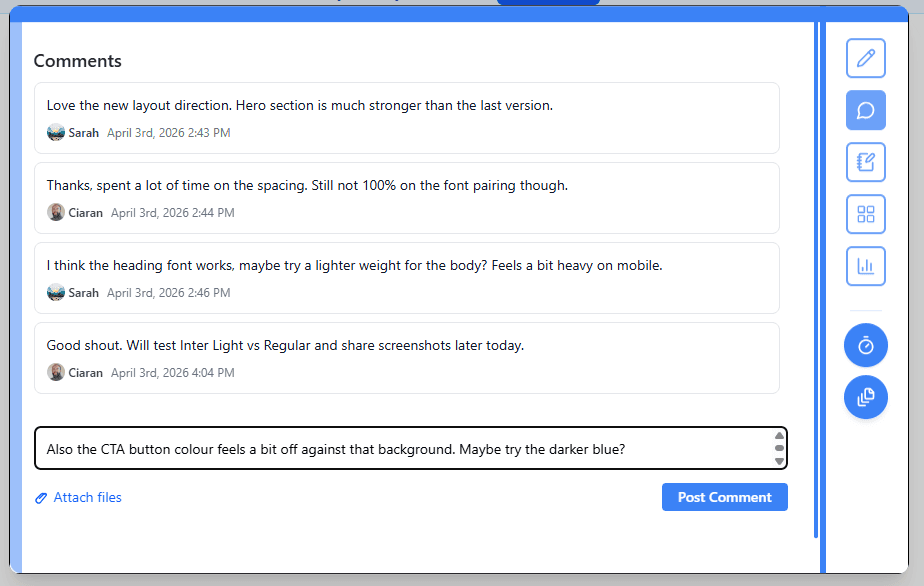
Every Goal, Project, Milestone, and Task can have its own comment thread. Leave yourself a note, track a decision, record why something changed. Comments keep the context attached to the work — so you never have to remember why you did something, because it's already written down.
Boards
Boards give you a visual space inside any element for images, files, links, and references. If you're working on a creative project and need a mood board, or a business project and need to keep key documents close, Boards is where that lives. Everything is visible at a glance, attached to whatever it belongs to.
Timer
A focused work timer built directly into the app. When you're ready to work, start the timer and go. No context switching to a separate app, no losing track of what you were doing. The Timer keeps your focused work connected to whatever you're working on.
Collaboration
Modes is great for solo workers — but often work involves other people. Collaboration is built around each Mode, which means you share exactly what's relevant and nothing else.
Every Mode can be shared with other people. As the owner of a Mode, if your collaborator is also a subscriber, you can invite them in the app and choose what level of access they have — an Editor can contribute and make changes, while a Viewer can see everything but can't edit. You stay in control at all times.
Pending invitations are tracked inside the Mode until accepted, and collaborators can be removed at any point. Everything outside the shared Mode stays completely private — your other Modes, your other work, none of it is visible to anyone you haven't explicitly invited.
Collaboration is intentional, not accidental. You decide what gets shared, with whom, and when.
AI Builder
The AI Builder is one of the most powerful tools in the app. It lets you describe what you want to build in plain language — and generates a complete, structured plan inside your current Mode.
Tell it something like “plan a product launch for next month” or “break down my website project into tasks” and the AI Builder produces the appropriate tree of elements that maps directly onto the app's structure. You can review everything it generates before anything is saved — toggling items in or out, renaming them, adjusting dates, or removing anything that doesn't fit.
Nothing is committed to your Mode until you're ready. Once you're happy with the plan, you apply it in one step and everything appears exactly where it belongs.
The AI Builder also works iteratively. You can prompt it multiple times — refining, expanding, or restructuring — and it understands the existing content of your Mode so it can suggest changes and additions that make sense in context, not just in isolation.
It's the fastest way to go from a blank Mode to a structured, actionable plan.
Putting It All Together
Here's what Modes looks like in practice for a freelancer juggling multiple things at once:
You have three Modes — Work, Personal, and Side Project.
Inside Work, you have a Goal: Land three new clients this quarter. Inside that Goal, a Project: Outreach campaign, which contains two smaller Projects — Email outreach and LinkedIn outreach — each with their own Tasks. You also have a handful of loose Tasks sitting directly in your Work Mode for quick things that don't belong anywhere specific.
Meanwhile inside Side Project, everything related to that is completely separate. Different Goals, different Projects, different Tasks. No crossover, no noise.
When you sit down to work on client outreach, you open Work mode and that's all you see. When you switch to your side project in the evening, Work disappears and Side Project is all that's there.
Compartmentalisation, versatility, and focus. These are the pillars Modes is built on.
Icon Glossary
A quick reference for the icons you'll see throughout Modes.
 Goal
Goal Project
 Milestone
 Add Task
 Home
Home Focus
Focus Calendar
 Notes
Notes Comments
 Boards
 Stats
Stats Timer
Timer Stopwatch
 AI Builder
 Collaboration
 Templates